Flex office software for enterprises: how to choose and roll it out


- Flex office software should make shared workspaces easy to find and book while helping workplace teams understand demand.
- Enterprises should assess integrations, site complexity, privacy, data quality, and employee experience (not just feature lists).
- A representative pilot, clear governance, and ongoing feedback help organizations deploy the platform responsibly and improve it over time.

What features should flex office software include?
Enterprise flex office software should combine desk and meeting room booking, interactive floor plans, team presence, check-in with automatic release of unused spaces, and occupancy analytics. It should also integrate with calendar and identity tools such as Microsoft 365, support multiple sites, and report on space use without unnecessary individual tracking.
Managing a flexible office across multiple buildings, departments, and hybrid schedules quickly becomes complex without the right infrastructure. For large organizations, adopting flex office software is about more than just digitizing desk assignments. The platform must integrate seamlessly into daily employee habits, connect with existing IT ecosystems, respect privacy standards, and deliver occupancy data leadership can trust.
The goal is not to make every desk bookable. It is to make office days easier to plan, spaces easier to navigate, and real estate decisions better informed.
What is flex office software?
Flex office software is a digital platform that lets employees book desks and meeting rooms, see who is on site, and find their way around the office. It also gives workplace teams data on how spaces are used.
It does not replace a hybrid work schedule policy. A policy defines expectations, such as when teams come in or which spaces they can use. Software helps put those rules into practice: employees can plan a visit, find a suitable place to work, and coordinate with colleagues.
For a large enterprise, the distinction matters. A booking tool that works for one office may not support different site layouts, local rules, access requirements, or employee workflows across a broader real estate portfolio.
Why are enterprises investing in flex office software?
Enterprises invest in flex office software because hybrid work makes office demand harder to predict. Teams may need different spaces on different days, while workplace and real estate teams need reliable information to plan capacity and services.
Employee experience is another consideration. In Gensler’s 2026 survey of 16,459 office workers surveyed in 2025 across 16 countries, two-thirds of respondents reported “hacking” their workspace to compensate for performance gaps. The report also identifies meeting-space availability and noise as ongoing challenges. Booking software cannot fix a poor workspace on its own, but it can help employees find appropriate spaces and help teams identify where demand and office design do not align.
Flex office, hot desking and desk sharing: what's the difference?
Flex office is the overall model: employees have no assigned desk and choose a space based on what they need to do. Hot desking is a first-come, first-served version with no booking. Desk sharing means there are fewer desks than employees, usually managed through bookings.
What should you look for in flex office software?
The right flex office software fits your workflows, your sites, your existing tools, and your privacy requirements. Start with the workflows your organization needs, then assess each platform against them.
Booking that reflects how people work
A good desk booking system should let employees easily find and book the spaces they need, such as desks and team areas, while meeting room booking software should show which rooms are free, and where. Consider how the system handles changes, cancellations, no-shows, and peak days. The test is not simply whether a booking can be made: can an employee understand what is available and where it is before traveling to the office?
A clear experience across sites
Large organizations operate across multiple offices, floors, space types, and regional requirements. While workplace teams need granular control to reflect local building rules, the employee experience should remain frictionless and intuitive across every campus. For employees, office space reservation should work the same way whether they visit headquarters or a regional hub. During a pilot, test the experience with employees across different roles, hybrid patterns, accessibility needs, and familiarity with each site.
Integrations with existing tools
Map the systems employees and administrators already use, such as calendars, identity and access tools, HR systems, or other workspace management software. Ask vendors to demonstrate how these integrations function in real day-to-day scenarios, ensuring smooth data flow and minimal friction for end users.
Useful, trustworthy workplace data
Ask what each metric measures. A booking, a check-in, a badge swipe, and physical occupancy are not necessarily the same thing. Teams should understand the data’s source, coverage, limitations, and refresh rate before using it to make planning decisions.
JLL reports that “improving space data accuracy has risen to the #2 corporate real estate priority” in its 2026 benchmark. Treat analytics as a basis for better questions and decisions, not as a substitute for understanding how people use the workplace.
Privacy and governance by design
Before rollout, clarify what data is collected, why it is needed, who can access it, how long it is kept, and how employees are informed. Prefer reporting that answers workplace-planning questions without exposing more individual-level information than necessary.
Have privacy, security, and legal teams review the proposed data flows and local requirements. Make the purpose of attendance or occupancy data clear to employees; avoid presenting workplace tools as individual performance-monitoring systems.
How to roll out flex office software across a large organization
A successful rollout follows five steps: define the problem, map policies and stakeholders, run a representative pilot, communicate clearly, then expand in stages.
1. Agree on the problem you are solving
Start with a defined business or employee need, such as difficulty finding a desk on busy days, poor visibility of team attendance, or a lack of reliable space-use information. Set a small number of measures to review after launch.
Possible measures include check-in rates, no-show rates, availability on peak days, employee feedback, and whether workplace teams can make more informed space-planning decisions.
2. Map policies, spaces and stakeholders
Document the rules the software needs to support, the types of spaces available, and any site-specific differences. Involve workplace, facilities, real estate, HR, IT, security, and privacy teams, as well as employee representatives, as appropriate. This can surface conflicting assumptions early, such as whether employees should book in advance or how team neighborhoods work.
3. Pilot representative locations and workflows
Choose pilot sites that reflect the organization’s real complexity, rather than testing only in the easiest office. Include employees and administrators. Check the full journey: planning an office day, finding colleagues, booking a space, changing plans, and getting help when something goes wrong.
Use the pilot to test whether configured rules make sense in practice, not only whether the software functions.
4. Communicate what is changing and why
Explain how the system works, what employees can use it for, and what data it collects. Give employees a way to ask questions and share feedback. Changing from assigned to shared spaces can affect routines and people’s sense of control, so involve employees in refining the experience.
5. Expand in stages and keep improving
Roll out by site, team, or use case, using what the pilot revealed. Review the measures you agreed on and investigate gaps before changing office capacity or policies. A rise in bookings alone, for example, does not show whether employees found spaces suitable or whether the office experience improved.
How can you tell whether the software is working?
The software is working when employees find a suitable space without friction, workplace teams manage busy periods more effectively, and real estate teams trust the data enough to plan with it.
Do not treat one utilization target as proof of success. The right interpretation depends on the organization’s goals, local work patterns, types of spaces, and how the data was collected. The aim is to learn whether the workplace supports the activities people come in to do, and adjust accordingly.
Frequently asked questions about flex office software
What is flex office software used for?
Is flex office software the same as hybrid work software?
Does flex office software integrate with Microsoft 365 and Teams?
Does flex office software monitor employees?
How many desks do you need in a flex office?
Choosing the right flex office software
Flex office software is most effective when it simplifies everyday office interactions and provides workplace teams with actionable evidence. For enterprise buyers, the strongest choice is rarely the platform with the longest feature list. It is the one that fits the organization’s workflows, integrates responsibly into existing IT environments, scales across sites, and supports continuous improvement through trustworthy data and employee feedback. For a broader overview of how organizations align people, spaces, and workplace operations, explore our hybrid workspace management guide.
How Witco supports flex office in large organizations
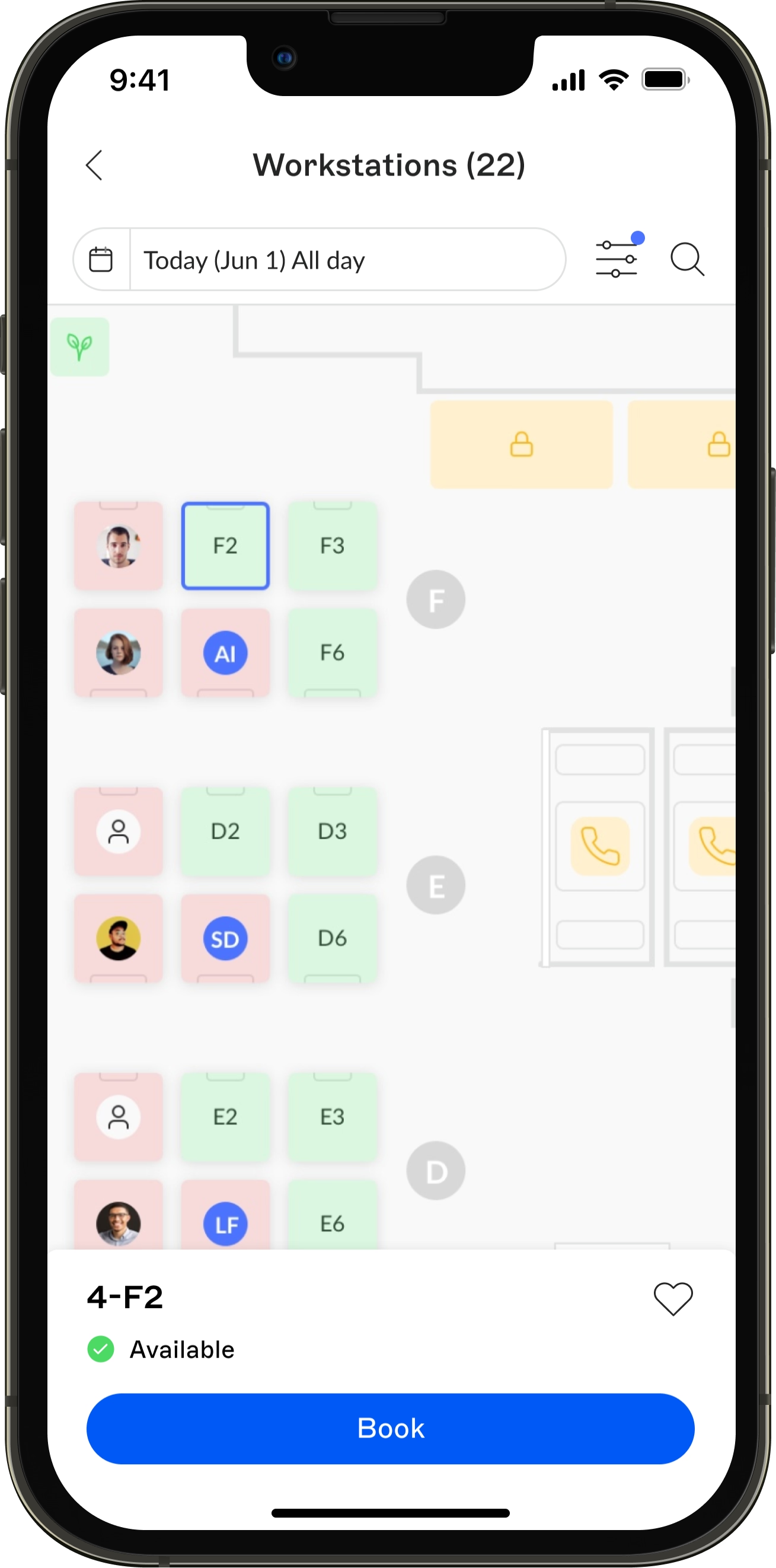
Witco is a workplace platform that helps large, multi-site organizations manage desk booking and meeting room booking as well as a full suite of workplace services in one place. Each building or space type can have its own booking rules and advance booking windows, so central teams keep control while each site keeps its local practices.
Employees can book from the Witco app or directly from Outlook and Teams through the Microsoft 365 integration. RoomPad displays outside meeting rooms show real-time availability and let people check in or book on the spot, for efficient booking management.