RoomPad web app: a simpler way to deploy meeting room booking software

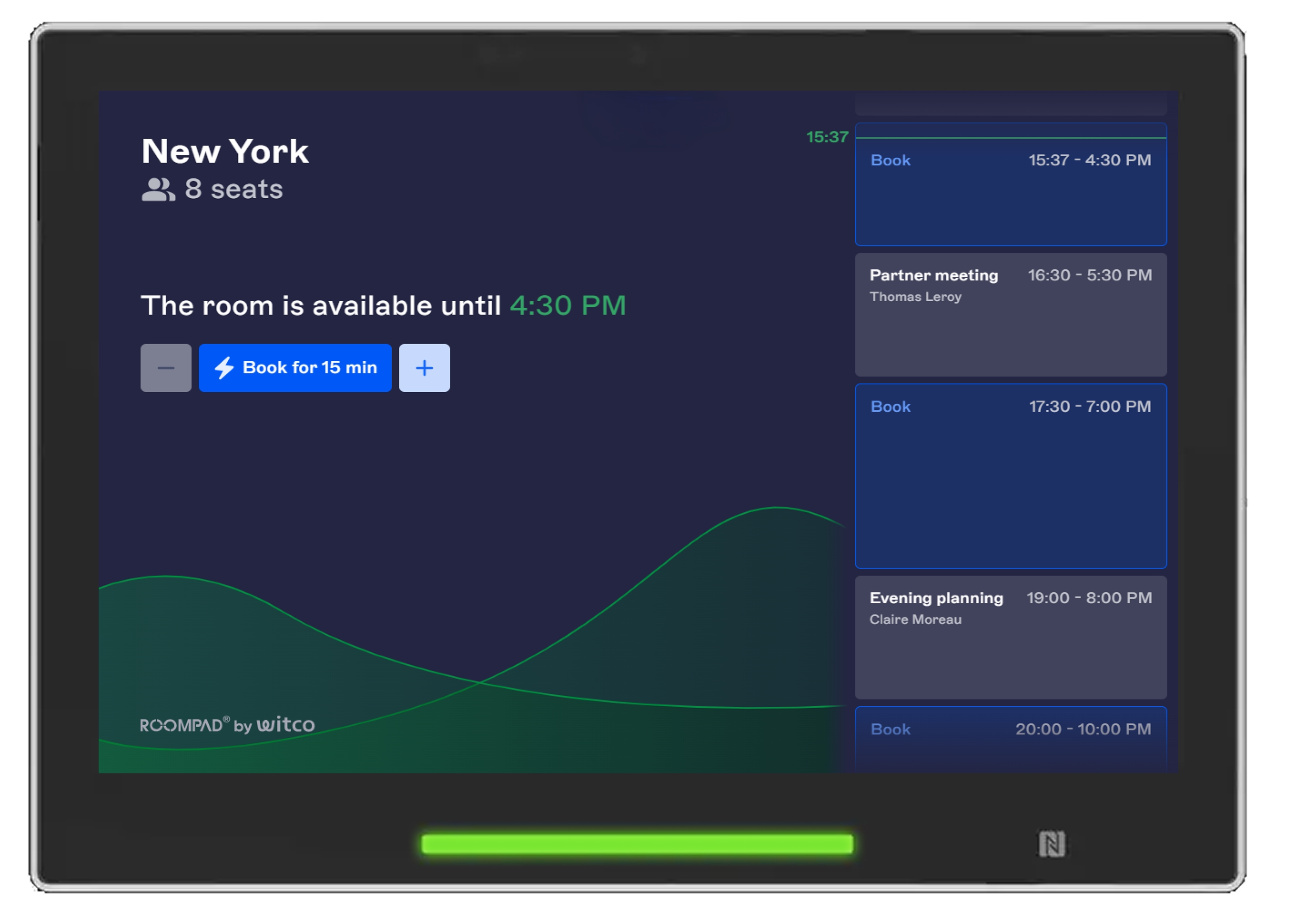
RoomPad is now available as a progressive web app: its meeting room booking software interface runs directly in a supported tablet browser, with no application to install on each device.
For IT teams: a simpler browser-based deployment, fleet-wide updates, lighter maintenance, and support for a broader range of compatible hardware.
For employees: essential actions at the meeting room door, including booking, checking in, extending a meeting, and releasing a room.
Thousands of employees use RoomPad tablets every day to see whether a meeting room is available, book an open time slot, check in, extend a meeting, or release a room early.
Now, the RoomPad web app brings that experience to a browser-based architecture. Instead of installing an application on every tablet, IT teams can run the RoomPad interface directly in a supported browser while keeping each display connected to the Witco platform.
Because the interface is delivered as a progressive web app, RoomPad is easier to deploy, maintain, and scale. In Android environments, there is no separate RoomPad application package (APK) to install and update device by device. And improvements can be delivered across the whole screen fleet at once.

What is a progressive web app?
in the device's browser while behaving like an installed app: full-screen display, instant touch response, and local data storage so the interface stays usable during brief network interruptions.
Because the interface is delivered through the web, IT teams do not need to install or update an application on each tablet. Improvements can be rolled out centrally and become available across the screen fleet without device-by-device intervention.
For employees, the experience remains application-like: a responsive, full-screen touch interface located right outside the meeting room.
Bringing meeting room booking software to the room entrance
RoomPad extends Witco's meeting room booking software to the place where employees need it most: the meeting room door.
Each meeting room booking display presents useful, up-to-date information, including the room's current status, upcoming bookings, and available time slots. Employees can act immediately instead of opening a separate tool or walking around in search of an available room or conference room.
The browser-based architecture preserves this simple employee experience while giving IT teams a more efficient way to configure, administer, and update their room scheduling displays.
A simpler deployment model for IT teams
RoomPad pairs each tablet with the appropriate Witco environment and space or conference room. Once configured, the display shows the information and actions associated with that room.
The technical requirements remain intentionally light: an internet connection, a compatible browser, WebSockets enabled, and supported hardware with the resolution and performance needed for a responsive experience.
For IT teams and integration partners, this approach makes rollouts across rooms, floors, buildings, and sites more predictable. Configurations can be standardized, and operational complexity drops, especially in multi-site and multi-campus portfolios.
Booking information that stays synchronized with Witco
The RoomPad web app is fully connected to the Witco ecosystem. The information displayed on the tablet stays synchronized with room bookings, booking policies, and calendar integrations.
When a booking is created or changed in Witco or through a connected calendar such as Microsoft Outlook or Google Calendar, the change appears on the RoomPad. Employees can see whether the room is free or occupied and make decisions based on current scheduling information.
This synchronization also supports more efficient room use. Employees can release a room they no longer need or extend a meeting when the next time slot is available. When check-in and room-release rules are enabled in the customer environment, workplace teams can also reduce the impact of unused bookings.
Essential actions for employees
The RoomPad web app supports the everyday tasks that keep meeting room booking simple:
- view room availability at a glance
- see details of the meeting in progress
- book an available room immediately
- book a time slot for later
- check in to confirm a booking
- extend a meeting in progress
- release a room that is no longer needed
These actions remove friction at the point of use. RoomPad connects employees, physical rooms, and the Witco platform in a single touchpoint, helping organizations make their meeting spaces easier to access and manage.
Fleet-wide updates without device-by-device app maintenance
With an installed application, each device must have the correct app version. Across a large tablet fleet, inconsistent versions can complicate maintenance and troubleshooting.
The RoomPad web app changes that model. Because the interface runs through the browser, product updates can be delivered centrally rather than installed separately on every device. IT teams can maintain a more consistent experience across their screen fleet and reduce the operational effort associated with local app updates.
The same architecture creates a more agile foundation for future changes to booking policies, check-in experiences, displayed information, and integrations with other workplace services.
Broader hardware compatibility
A web interface makes it possible to support a broader hardware strategy, but compatibility still depends on technical requirements. The RoomPad web app can run on supported touch-screen devices that meet the requirements above.
Core booking features are delivered through the browser. Hardware-dependent capabilities, such as LEDs or NFC, rely on APIs made available by device manufacturers. Witco manages these differences through hardware profiles, which allow the application to identify and use the capabilities available on a supported device.
This approach helps create a consistent employee experience, with room to adapt on the hardware side, including screens your organization may already own.
Easier management across buildings and sites
As organizations add more rooms and tablets, administration becomes just as important as the employee experience. The RoomPad web app is designed to make a fleet of digital meeting room signs easier to deploy, configure, and maintain across a building, campus, or multi-site workplace portfolio.
This scalability benefits several teams:
- employees receive a consistent booking experience from one room or site to another
- IT teams spend less time managing local application versions
- integration partners can standardize and scale deployments
- facility and workplace teams gain a reliable touchpoint for managing rooms and supporting workplace operations
RoomPad also connects the physical room experience with Witco's workspace management software, helping organizations coordinate digital booking journeys with what employees see and do in the workplace.
Connecting the physical workplace to a unified digital experience
A meeting room booking display is more than a sign. It is an interactive point where employees can make a decision at the moment it matters: enter an available room, confirm a booking, release unused space, or extend a conversation without unnecessary steps.
By connecting this physical touchpoint to Witco, RoomPad becomes part of a unified digital workplace in which room booking, desk booking, workplace services, and space-management information can work together in one consistent experience.
The result is not simply another screen on the wall. It is a practical link between workplace policies, scheduling systems, physical spaces, and the people using them.
Frequently asked questions about RoomPad
Do I need to install the RoomPad app on every device?
Does RoomPad synchronize with Outlook, Google Calendar, and other calendars?
What devices support the RoomPad web app?
What happens if the internet connection is interrupted?
Can RoomPad web app be managed across multiple floors, buildings, or sites?
A modern foundation for what comes next
The RoomPad web app provides a flexible foundation for continuing to improve the meeting room experience. Witco can progressively enhance the interface, support evolving workplace needs, and take advantage of compatible hardware capabilities without requiring organizations to rethink their entire display deployment.
The objective remains the same: evolve RoomPad in response to how workplaces and employees use meeting spaces, while keeping the experience simple for employees and manageable for IT teams.
The last three feet of the booking experience
Workplace strategies are planned through policies, dashboards, and utilization goals. But for an employee, the experience often comes down to the last three feet outside a meeting room, seconds before a meeting begins.
RoomPad turns booking rules and scheduling data into information employees can act on at that exact moment. With a browser-based interface and centrally managed updates, organizations can scale a consistent room-booking experience without adding device-by-device RoomPad app maintenance.
That is the value of the RoomPad web app: extending meeting room booking software all the way to the meeting room door while making the underlying screen fleet easier for IT teams to manage.