Witco Outlook add-in streamlines meeting room booking and visitor management


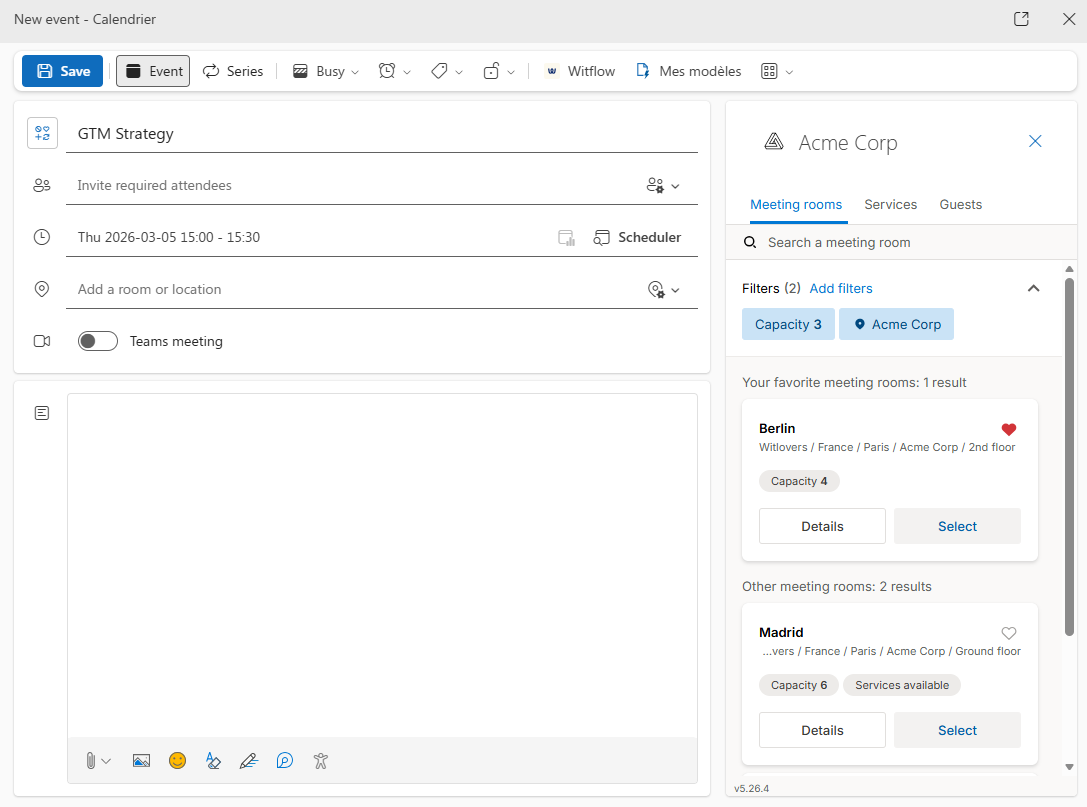
The Witco add-in for Outlook centralizes room reservations, services, and visitor management in your calendar, eliminating the need to switch between applications.
How the Witco add-in for Outlook revolutionizes office space reservation
Scheduling meetings shouldn’t involve a maze of apps and manual coordination. To create a unified and seamless experience for meeting organizers, the Witco office reservation app integrates comprehensive room booking and visitor management capabilities directly into Microsoft Outlook.
Designed to bridge the gap between your email calendar and your workplace operations, this powerful extension to the office reservation app centralizes all key tasks related to office space reservation, service ordering, and visitor management.
All-in-one workspace booking within Outlook
The Witco platform is already a favorite among organizations looking to streamline workplace management. With the Outlook add-in, it brings its features directly where teams spend their time: the calendar.
This innovative workspace booking system eliminates the need to switch between multiple applications, creating a seamless experience that saves time and reduces booking errors.
When organizing meetings, users can now handle all aspects of meeting room reservation without ever leaving Outlook, making it the most efficient office reservation app solution available for Microsoft-centric workplaces.
"A key challenge in implementing workplace tools is the need for employees to adjust their practices. With the Outlook add-in, we have adopted a different approach, going to the customers rather than waiting for them to come to our tool." — Carole Ramstein, VP Marketing at Witco
Advanced meeting room booking features
Smart meeting room schedule
The Witco workspace booking system available into Microsoft Outlook offers sophisticated filtering options that revolutionize how teams approach meeting room reservation:
- Capacity-based booking: Find rooms that perfectly match your group size requirements
- Location-specific reservations: Choose office space reservation options convenient for all attendees
- Equipment-focused filtering: Select meeting rooms based on AV equipment, whiteboards, or specialized technology
- Feature-based selection: Filter office space reservation options by amenities like natural light, accessibility features, or room layout
Each meeting room option includes comprehensive details such as high-quality photos, real-time availability schedules, and associated services, providing complete transparency in your office reservation app experience.
Integrated service management within your workspace booking system
Once you've selected your perfect meeting space, the Witco add-in opens up access to all available services for that room. Need catering for a lunch meeting? Require specific AV setup? Want refreshments delivered at a particular time? You can place these orders directly within your Outlook event creation process.
Also note that the dynamic nature of this workspace booking system allows for easy modifications. Simply reopen your Outlook event to adjust or cancel service requests. Any service booking remains flexible until the fixed deadline when preparation begins.
Automated visitor management
On top of a streamlined workspace booking system, Witco add-in for Outlook now includes sophisticated visitor management that integrates seamlessly with your scheduling process.
How does it work?
As you add participants to your Outlook event, the office reservation app automatically:
- Retrieves attendee information for efficient office space reservation coordination
- Invites organizers to identify external visitors requiring pre-registration
- Syncs visitor details across the entire workspace booking system
- Sends professional confirmation emails with all necessary details
- Provides automated check-in notifications for seamless arrival experiences
Creating a visit directly from Outlook
From the add-in’s “Guests” tab, you can:
- Select the building where you want to host your visitors
- Identify your external guests among the meeting attendees
- Automatically pre-fill information for recurring visitors
- Change the visit host by replacing yourself with one of your coworkers
- Create the visit in one click
The visit is automatically saved in Witco’s Visitor Management module, and synchronization with your integrated tools (ARD for access control, Ucopia or Cisco Meraki for Wi-Fi access) is automatically triggered, when applicable.
Edit or cancel a visit
Need to change visit details or the meeting time? Just go back to your Outlook event, open the Witco add-in, and click “Edit visit.” All changes are synchronized in real time with the visitor management system.
If the meeting is canceled, you can delete the visit directly from the add-in. The deletion is automatically reflected in the Visitor Management module.
Why teams love the Witco add-in for Outlook, advanced meeting room booking solution
Enhanced professional experience
This office reservation app ensures a premium experience for both organizers and guests. The automated communication features of the workspace booking system keep all parties informed, while streamlined check-in processes eliminate typical reception bottlenecks associated with traditional office space reservation methods.
"What sets the add-in apart is the domino effect: when an employee saves five minutes organizing a meeting, reception also saves five minutes on check-in, and visitors save five minutes waiting. This efficiency spreads throughout the entire chain." — Carole Ramstein, VP Marketing at Witco
Complete meeting visibility
Never lose track of your meeting logistics again. The add-in provides a centralized view within Outlook of all bookings and service orders associated with your scheduled meetings. This transparency helps prevent double-bookings, missed service requests, and communication gaps.
Dramatic time savings
Perhaps the most significant advantage of this workspace booking system is the elimination of app-switching chaos. Instead of juggling multiple platforms to schedule one meeting, the Witco add-in lets you accomplish everything in a single workflow. When you hit "Send" on your Outlook invitation, you've already:
- Secured the perfect meeting room
- Ordered all necessary services
- Registered external participants
- Set up automated visitor communications
This streamlined approach to the reservation of meeting rooms allows teams to focus their energy where it matters most – preparing excellent meeting content rather than managing logistics.
Seamless integration and customization
The Witco add-in leverages Single-Sign-On authentication, providing users with a frictionless experience that feels native to their existing workflow to book meeting rooms. For organizations focused on brand consistency, the add-in can be fully customized with company-specific logos and naming conventions, ensuring a cohesive user experience that aligns with corporate identity while maintaining all advanced conference room reservation capabilities.
Frequently asked questions about the Witco Outlook add-in
What happens if I change the meeting time in Outlook?
Which security integrations are supported?
Do visitors receive a confirmation?
Is the Witco Outlook add-in compatible with all Microsoft 365 plans?
How do I install the Witco add-in for my team?
The Witco Outlook add-in: unify your workplace management
The Witco Outlook add-in transforms how organizations manage their workplaces by integrating meeting room booking, service ordering, and visitor management directly into Microsoft Outlook. This approach eliminates the need to switch between multiple apps and improves operational efficiency across the organization.
Whether you are scheduling an internal meeting, hosting external guests, or coordinating a multi-site event, the add-in streamlines every step of the process. Teams save time, reception teams can provide a better welcome, and visitors enjoy a smooth experience from the moment they arrive.
Ready to try the Witco Outlook add-in? Contact our team for a personalized demo, or learn how Witco supports 500+ organizations in optimizing their workplace management.