Essential features for a modern meeting room booking system


When evaluating meeting room booking systems, manager should consider:
- Reliable real-time availability (single source of truth) across all touchpoints (app, web, calendar, room panels, maps), so people can actually trust what they see.
- Native Outlook and Google Calendar integration so employees can book directly from the meeting invite. It drives adoption and avoids conflicts.
- Smart search and strong filters (capacity, location, equipment), ideally with AI recommendations to pick the right room fast.
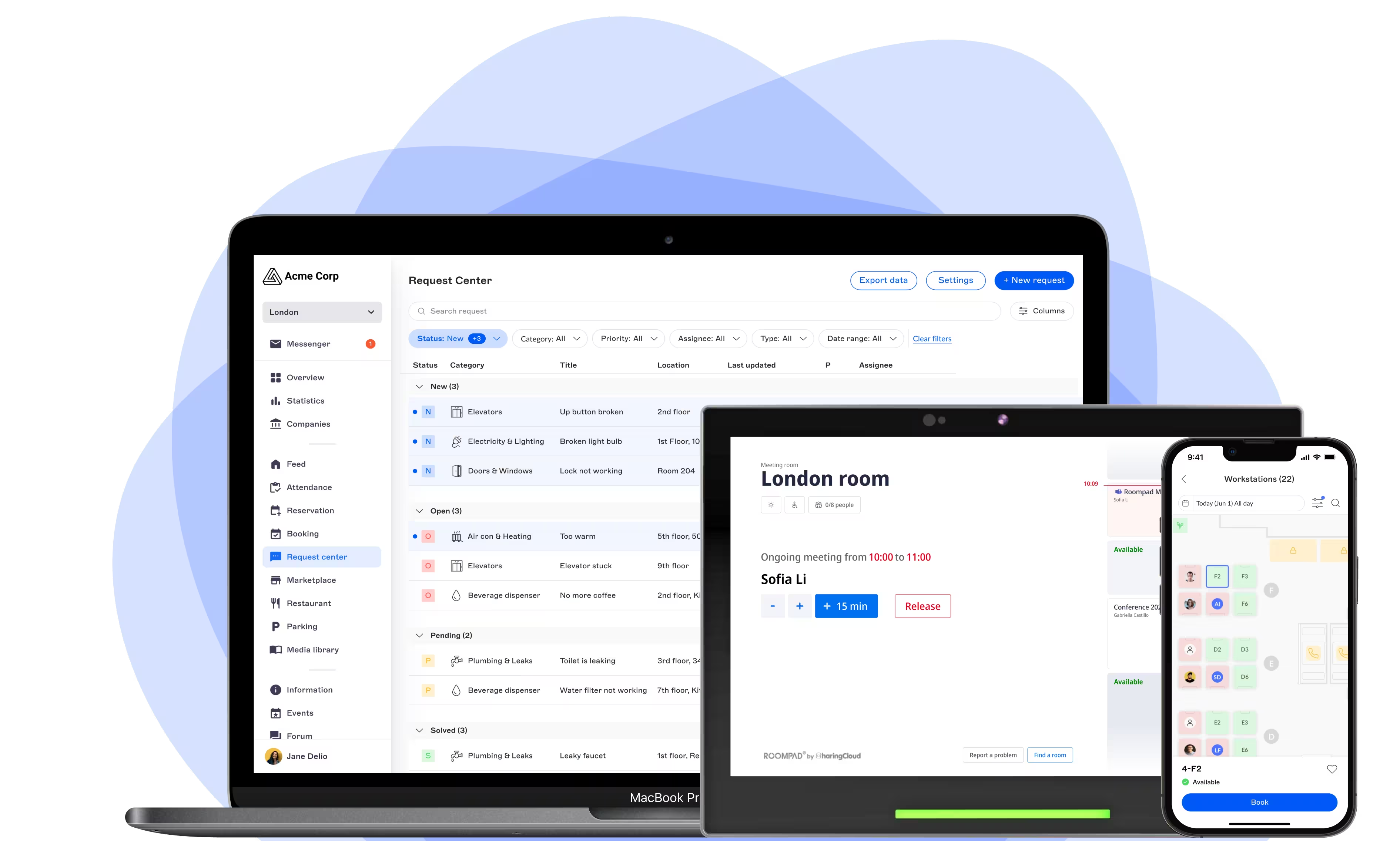
- On-site experience with room displays for visibility and on-the-spot actions including simple check-in, booking on the fly, meeting extension, or room release to reduce no-shows.
- Combining configurable booking rules with strong analytics, so workplace teams can enforce policies and make better long-term space decisions.



What are essential features for a modern meeting room booking system?
A modern meeting room booking system succeeds when its core features work together: reliable real-time availability, calendar integration, smart search, on-site displays, and clear analytics. Together, these reduce daily friction, prevent no-shows, and give workplace teams the data they need to manage space effectively.
In large companies with offices gathering thousands of employees, the meeting room is one of the most contested resources in the buildings. Finding and booking the right meeting room often creates unnecessary friction: rooms appear free but are actually occupied, employees waste time walking around the office, and workplace teams lack reliable data to optimize space usage.
An innovative meeting room booking system solves more than the act of reserving a room. It connects people, spaces, calendars, displays and workplace data into one seamless experience.
After years of supporting worldwide enterprises and hybrid workplaces, we can share a clear shortlist to help you recognize the capabilities that truly make a difference: the ones your employees will feel from day one, and the ones your workplace strategy will rely on for years.
What is a meeting room booking system?
A meeting room booking system is a software solution that lets employees search, reserve and manage meeting rooms, while giving workplace teams visibility and control over how those spaces are used. Innovative systems extend beyond simple reservation to include calendar integration, mobile access, room displays, services, visitor management and analytics.
1. Meeting room booking software sharing real-time room availability you can actually trust
Reliability is key. An efficient meeting room reservation system must show accurate availability in real time, across every channel where employees might look (mobile app, web portal, calendar, interactive map, room panel). The moment availability diverges between two tools, employees stop trusting the system and fall back on informal habits like blocking rooms “just in case”. A reliable single source of truth is not a nice-to-have; it is the foundation everything else depends on.
2. Native integration with Outlook and Google Calendar
Most meetings are not created in a booking app. They are created in a calendar. Your meeting room reservation system should therefore live where your teams already work: Microsoft Outlook, Microsoft 365, Exchange, Google Workspace, etc. The best implementations let employees search rooms, see availability and confirm a booking without leaving their meeting invite.
For Microsoft-heavy organizations, dedicated Outlook add-ins exist that take this further by bringing advanced filtering, services and visitor management directly into the invite flow. The principle is simple: the more the tool adapts to existing habits, the higher the adoption.
3. Smart search that helps people find the right meeting room
A two-person phone booth and a twenty-person boardroom should not appear in the same flat list. A well-designed booking app should help employees narrow down options in seconds, with filters such as:
- Location, building or floor
- Capacity and room type
- Available equipment and video conferencing setup
- Favorite rooms and recently used spaces
In multi-site organizations especially, smart search is what turns a directory of rooms into a usable workplace tool.
Innovative solutions go even further with AI-powered smart room recommendations: the system can suggest the best-fit meeting room based on usage patterns and context, such as real-time availability, capacity, equipment and services, recurrence and past booking patterns. This guided experience makes reservations effortless for employees, and helps workplace teams drive adoption and better utilization.
4. Interactive map connected to meeting room reservation system and wayfinding capabilities
Whether you are a new employee trying to find your way around or you work in an office building so large that it’s impossible to remember the names of all the rooms, a map is often much more effective than a list of rooms when making a reservation.
Interactive floor plans allow employees to view availability in context, choose a room close to their team, and see the best route to get there. For remote workers who only come in occasionally, this tool often makes all the difference by letting them get their bearings before arriving and find their way quickly once they’re there.

5. Meeting room booking displays for on-site booking and check-in
A modern booking experience does not end at the calendar. It continues on the door of the room itself. Digital meeting room signs (or tablets) make spontaneous workplace moments far smoother, by letting people:
- See at a glance whether the room is free, busy or about to be busy
- Book an available room on the spot for a quick discussion
- Extend a meeting that is running long
- End a meeting early and release the room for others
This on-site layer is where most of the daily, unplanned interactions actually happen, and where a good system quietly proves its value. Indeed, above booking management, tablets can also be used for incident reporting, wayfinding, corporate communication, or even triggering an alert. Such capabilities add up to a better employee experience on site.
6. Check-in and no-show management
No-shows are the single biggest source of wasted meeting room capacity. The best meeting room booking systems require a lightweight confirmation (through the mobile app, a QR code, a room display, a badge or an occupancy sensor) and automatically release rooms that nobody actually used. The point is not to police employees, but to make sure that any meeting room left empty is made available for others.
7. Configurable booking rules
Every organization has its own policies: how far in advance bookings can be made, who can reserve which rooms, whether recurring meetings are allowed, how long buffers should be, which spaces require approval. A serious booking platform makes these rules configurable rather than assumed. The right system bends to your workplace policy; it does not force your policy to bend to it.
8. Workplace analytics
Finally, a modern system should give workplace, facility and real estate teams a clear picture of how spaces are actually used. The metrics that tend to matter most are:
- Occupancy and utilization rates by room, floor or site
- No-show rates and average meeting duration
- Peak usage times and demand by capacity
Over time, this data becomes one of the most valuable inputs for office design, hybrid policy and real estate decisions. If a well-designed booking system aims to enhance the user experience, analytics is the strategic payoff.
How to read this list when you compare vendors of meeting room booking systems
If you take only one thing from this article, take this: a modern meeting room booking software is judged less on the length of its feature list than on how well those features connect. Real-time availability is only useful if it flows into Outlook and into the room display. Check-in only reduces no-shows if it is easy on mobile, on a tablet (like RoomPad devices), or via QR code. Analytics only matter if the data behind them is clean, which means a single, well-integrated platform rather than a patchwork of tools.
That is the lens we use at Witco when we help organizations rethink room booking: starting from the employee experience, designing for the tools people already use, extending it to the physical workplace with digital signage including kiosks with interactive maps and digital meeting room signs. In addition, our all-in-one workplace experience platform closes the loop with services, visitor management and analytics.
The essential features are the ones that, together, make booking a room feel effortless, and make client-facing meetings feel professional from arrival to follow-up.
.webp)
Answers to your questions about modern meeting room booking software
Why is calendar integration so important?
How do meeting room displays and check-in reduce no-shows?
How does Witco approach meeting room booking?